vimsynth/modules/vco
VCO
The main oscillator. Four waveforms, chosen with a knob — so its timbre cannot be modulated. Use WAVE when you want to sweep the timbre.
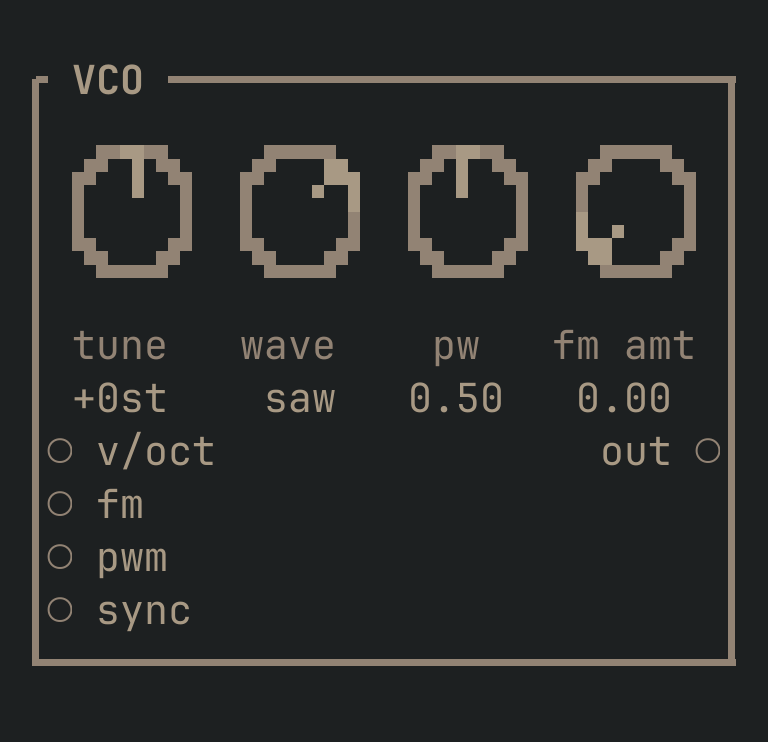
VCO to get this card.inputs
Down the left edge of the card, top to bottom.
- v/octpitch
- Pitch. 1.0 = one octave up.
- fmcv
- Frequency modulation, scaled by the
fm amtknob. An LFO here at low depth is vibrato. - pwmcv
- Pulse-width modulation. Only audible on the square wave, where it is the classic 'moving' string sound.
- synctrigger
- Hard sync: resets the oscillator's phase, forcing it to the frequency of whatever drives this. Aggressive, metallic.
outputs
Down the right edge, in the same order.
- outaudio
- The sound.
knobs
Left to right across the face — the dials in the picture.
- tune-24 … 24 st= 0 st
- Pitch offset in semitones.
- wavesine · tri · saw · sqr= saw
- The waveform.
sawis bright and full (strings, brass, bass);sqris hollow and reedy;triis soft;sineis pure. A CHOICE — it cannot be modulated. Use WAVE if you need to sweep it. - pw0.02 … 0.98= 0.5
- Pulse width. Only audible on
sqr. Modulate it with an LFO for the classic slow-moving string sound. - fm amt0 … 1= 0
- How far the
fminput moves the pitch. Small values are vibrato; large values are clangorous FM.
more
The full reference — every parameter curve, the patching notes and the worked examples — lives in the manual: docs.vimsynth.com/modules/vco. In the app itself, :help VCO opens the same page without leaving the rack.