vimsynth/modules/ccout
CCOUT
Four CV lanes out as MIDI control change — the rack *modulating* a hardware synth, where MOUT plays it. Each input takes a CV in 0..1 and sends it as a 7-bit CC on a number you pick, so an LFO here opens a real filter the way it would open a VCF. Lanes send only when their value actually changes, and no more than rate times a second — a DIN cable cannot carry more.
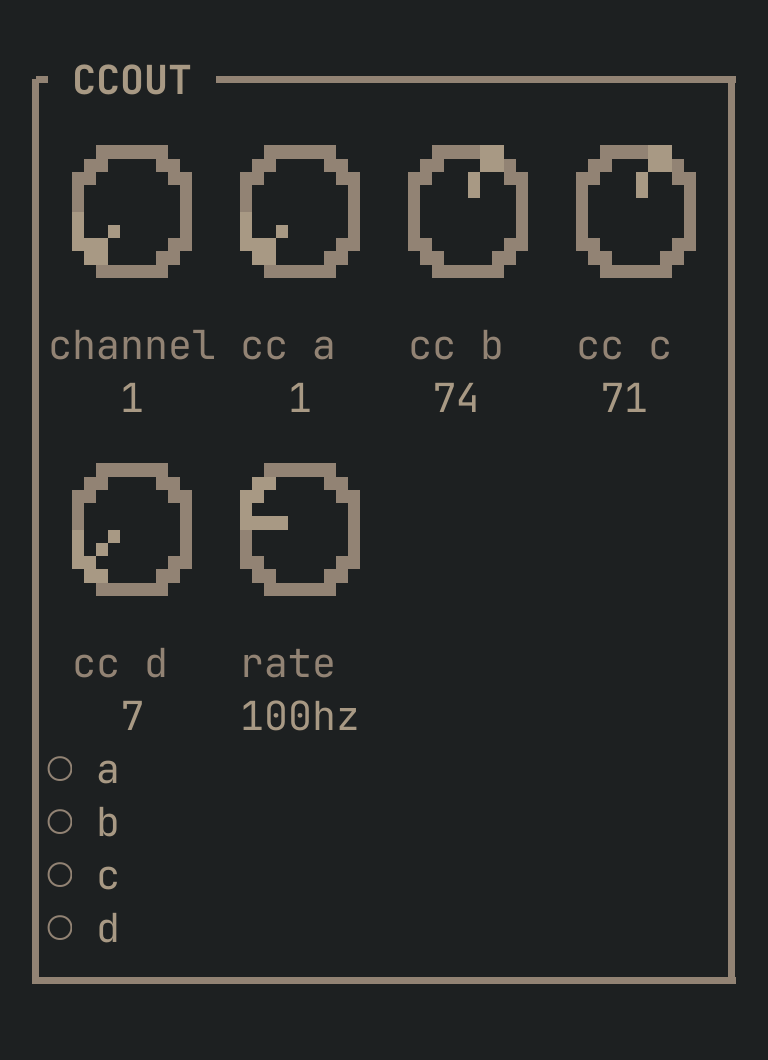
CCOUT to get this card.inputs
Down the left edge of the card, top to bottom.
- acv
- 0..1, sent as the CC number in
cc a. Values outside 0..1 clamp — use an ATT to fit a bipolar LFO into range. - bcv
- 0..1, sent as the CC number in
cc b. - ccv
- 0..1, sent as the CC number in
cc c. - dcv
- 0..1, sent as the CC number in
cc d.
knobs
Left to right across the face — the dials in the picture.
- channel1 … 16= 1
- Which MIDI channel to send on, 1–16.
- cc a0 … 127= 1
- The CC number lane
asends on. 1 is the mod wheel. - cc b0 … 127= 74
- The CC number lane
bsends on. 74 is brightness — filter cutoff on most synths. - cc c0 … 127= 71
- The CC number lane
csends on. 71 is harmonic content — usually resonance. - cc d0 … 127= 7
- The CC number lane
dsends on. 7 is channel volume. - rate1 … 500 hz= 100 hz
- Ceiling on messages per second, per lane. Raise it for smoother sweeps, lower it if a DIN port is struggling — four lanes at 100 Hz already use about a third of what a MIDI cable can carry.
more
The full reference — every parameter curve, the patching notes and the worked examples — lives in the manual: docs.vimsynth.com/modules/ccout. In the app itself, :help CCOUT opens the same page without leaving the rack.