vimsynth/modules/slice
SLICE
Plays one piece of a recording that has been cut into several, chosen by pos — a 0..1 CV, so a sequencer's own pitch/CV output can pick which slice fires, the way it would pick a note. gate fires it (rising edge only, like SMPL — it plays the whole slice, not just while held). Where the cuts themselves come from is the splice editor, not this card.
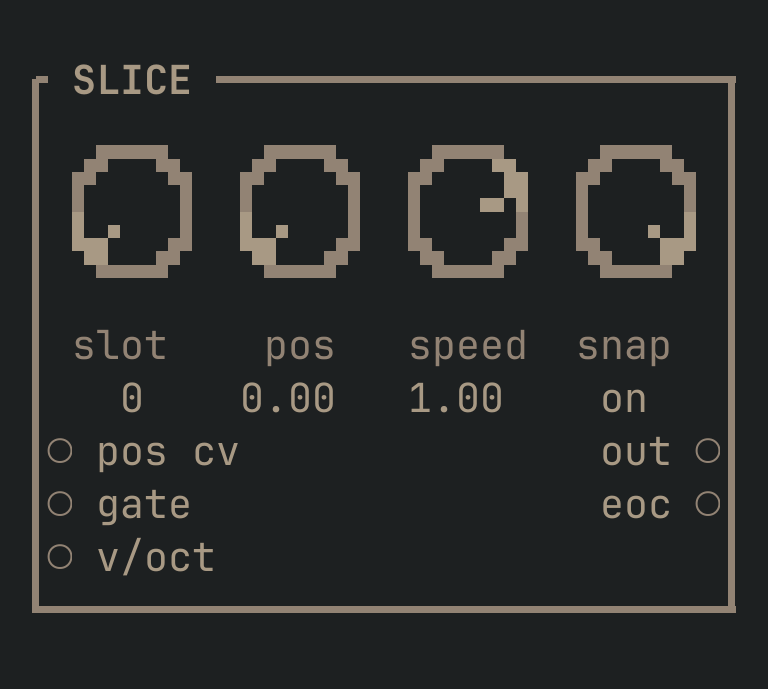
SLICE to get this card.inputs
Down the left edge of the card, top to bottom.
- pos cvcv
- Added to the
posknob to pick which slice fires next — a sequencer's own pitch/CV output can address a slice exactly like a note. - gatetrigger
- Fires the chosen slice from its own start. Named for what usually drives it — a SEQ's gate output — but only the rising edge matters: it plays the whole slice, not just while this stays high.
- v/octpitch
- Transposes playback. 1.0 = an octave up, so the same slice can be played at a different pitch under a keyboard or a sequencer.
outputs
Down the right edge, in the same order.
- outaudio
- The chosen slice, playing.
- eoctrigger
- Fires when the slice finishes.
knobs
Left to right across the face — the dials in the picture.
- slot0 … 63= 0
- Which bank slot.
- pos0 … 1= 0
- Which slice, as a fraction across however many the slot has been cut into. Address it exactly like a note —
pos cvis what a sequencer actually turns. - speed-2 … 2= 1
- Playback rate. NEGATIVE PLAYS THE SLICE BACKWARDS.
- snapoff · on= on
- Snap the slice's own start and end to zero crossings so it does not click. Leave it ON.
more
The full reference — every parameter curve, the patching notes and the worked examples — lives in the manual: docs.vimsynth.com/modules/slice. In the app itself, :help SLICE opens the same page without leaving the rack.