vimsynth/modules/smpl
SMPL
Plays a recording from a sample bank slot. Start/end points, looping, and a SIGNED speed — negative plays it backwards. snap puts the loop points on zero crossings so a loop does not click.
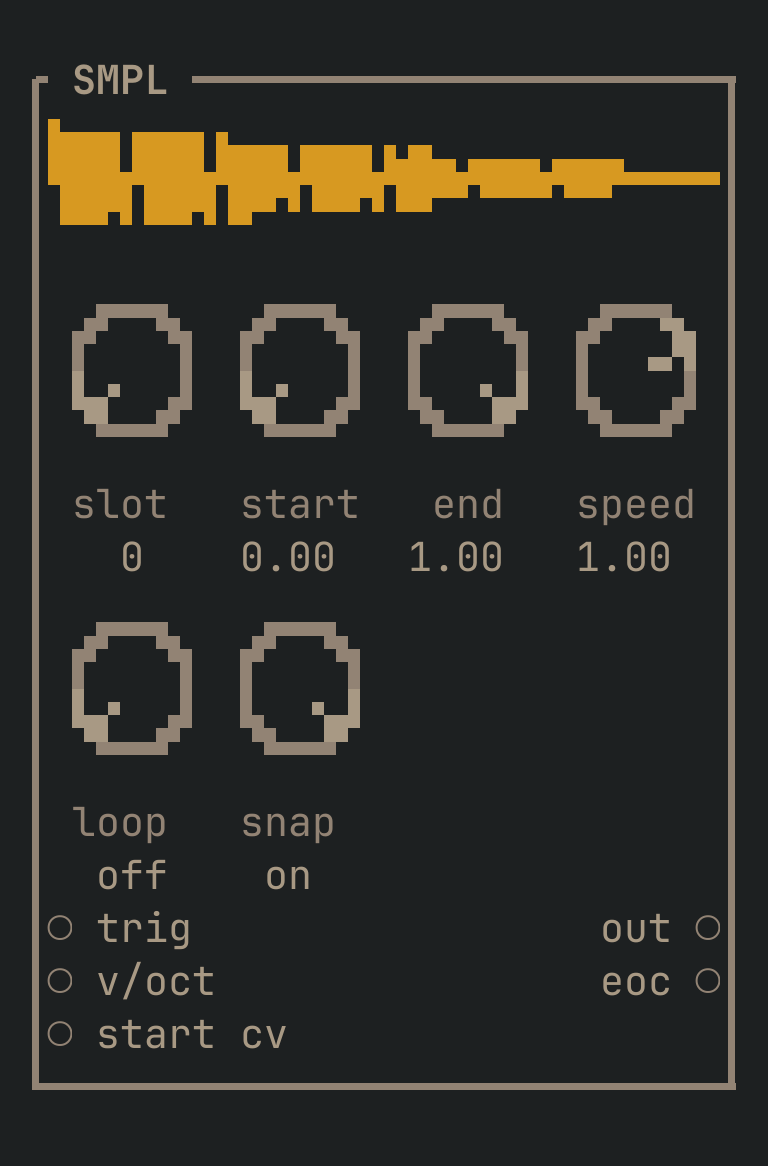
SMPL to get this card.inputs
Down the left edge of the card, top to bottom.
- trigtrigger
- Starts playback from
start. - v/octpitch
- Transposes playback. 1.0 = an octave up, so a SEQ plays a sample like an oscillator.
- start cvcv
- Moves the start point.
outputs
Down the right edge, in the same order.
- outaudio
- The recording, playing.
- eoctrigger
- Fires when it reaches the end. Chain it to another SMPL's
trigto play two sounds in sequence.
knobs
Left to right across the face — the dials in the picture.
- slot0 … 63= 0
- Which bank slot.
- start0 … 1= 0
- Where to start, as a fraction of the sound.
- end0 … 1= 1
- Where to end.
- speed-2 … 2= 1
- Playback rate. NEGATIVE PLAYS IT BACKWARDS.
- loopoff · on= off
- Loop between
startandendinstead of stopping. - snapoff · on= on
- Move the loop points to zero crossings so the loop does not click. Leave it ON.
more
The full reference — every parameter curve, the patching notes and the worked examples — lives in the manual: docs.vimsynth.com/modules/smpl. In the app itself, :help SMPL opens the same page without leaving the rack.