vimsynth/modules/catch
CATCH
The rack's SHORT-TERM MEMORY: a micro-looper with no start command. It is always listening — recording into a ring nobody named — and the catch gate does not start it, it says KEEP WHAT JUST HAPPENED. Play something, decide afterwards that you wanted it, and it is already there. Length is in BEATS off clk (down to a sixteenth, which at any usual tempo is a grain rather than a phrase). Three ways to play the loop back: tape (a speed, forwards or backwards), stretch (grains creeping through it, so it plays at pitch while moving slower than it was recorded) and env (your PLAYING interrupts it — loud stops the playhead dead, quiet lets it crawl, which is time-stretching by touch). Dropping catch erases and re-records in place. dub overdubs, and fade below 1 makes the loop a delay you play into. keep promotes the caught loop into a bank slot, where GRAIN, SLICE and SMPL can get at it. Reach for it for glitch, stutter, texture from live playing, or anything described as caught, fleeting, half-remembered.
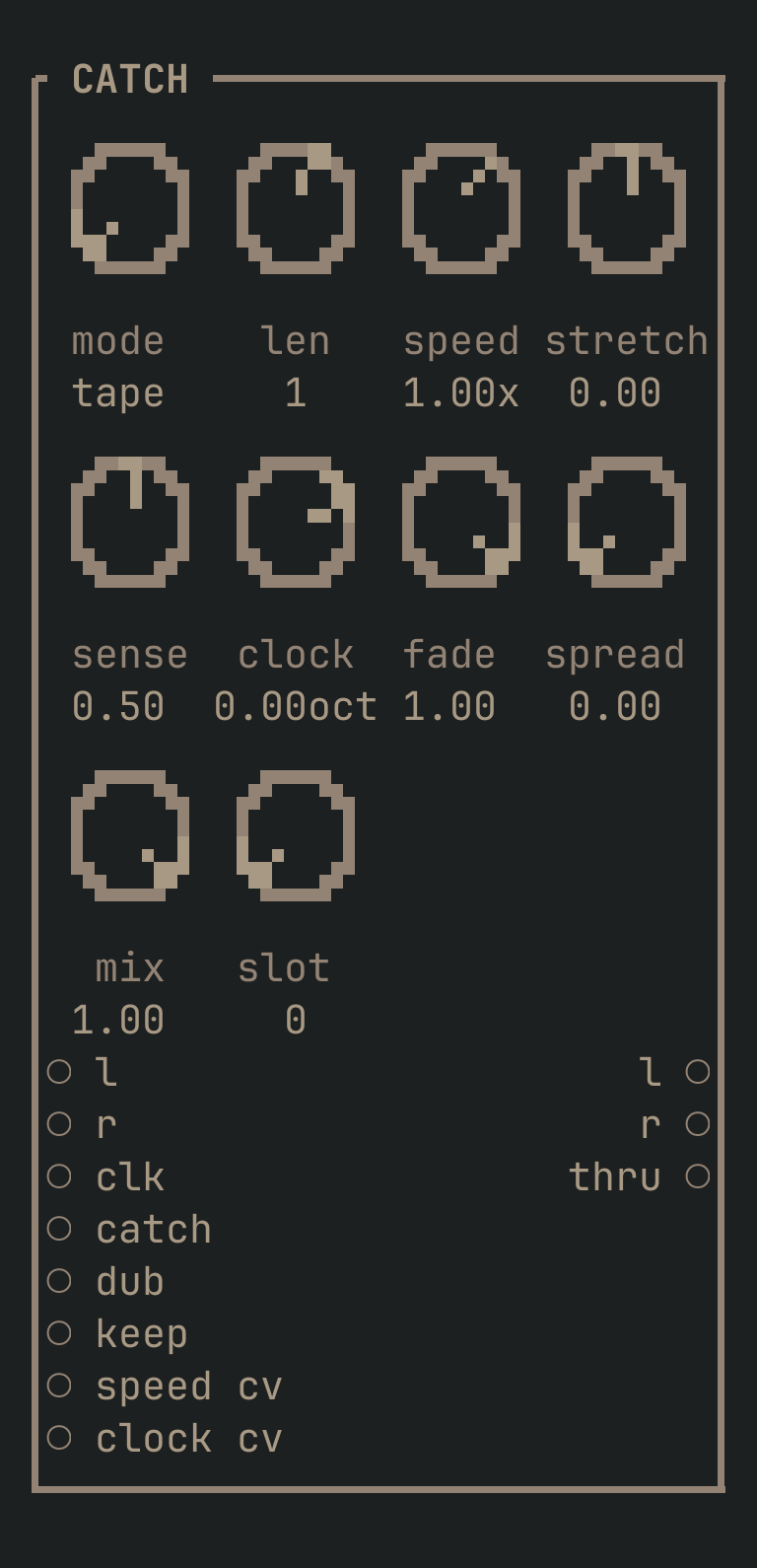
CATCH to get this card.inputs
Down the left edge of the card, top to bottom.
- laudio
- What it listens to, left. It is recording this whenever
catchis low — always, without being asked. - raudio
- The right side. Normals from
l, so one cable in is a mono looper. - clktrigger
- The beat the loop's length is measured in. Patch the same CLOCK the rest of the patch runs on and the loops line up with it. With nothing here a beat is assumed to be half a second (120 BPM) until two edges have been seen.
- catchgate
- KEEP WHAT JUST HAPPENED. The rising edge stops the recording and takes the
lenbeats that already went by; while it stays high the loop plays. Dropping it does not pause — it goes back to listening, which means recording over the loop. - dubgate
- Overdub: play the loop AND write on top of it.
fadedecides how much of the previous pass survives each time round. - keeptrigger
- Writes the caught loop into bank slot
slot, where GRAIN, SLICE and SMPL can reach it — short-term memory promoted to long-term. It goes in mono, as everything the bank holds does. - speed cvcv
- Moves playback speed, summed with the knob. Through zero and negative, so a slow LFO here rocks the loop backwards and forwards.
- clock cvcv
- Moves the whole thing's rate in octaves, summed with the knob — 1.0 is an octave up and twice the speed.
outputs
Down the right edge, in the same order.
- laudio
- The loop, left. Silent while it is listening — it has nothing to say until you catch something.
- raudio
- The right side. With
spreadup intapemode this plays the loop FORWARDS while the left plays it backwards, which turns one caught chord into a room. - thruaudio
- The input, untouched, so this drops into the middle of a chain without a MIXER to split the signal.
knobs
Left to right across the face — the dials in the picture.
- modetape · stretch · env= tape
- How the loop plays back.
taperuns a playhead atspeed, forwards or backwards — the one that keeps the audio recognisable.stretchreads it with overlapping grains that creep through the loop slower than it was recorded, so it holds its pitch while slowing down.envhands the playhead to your PLAYING: seesense. - len1/16 · 1/8 · 1/4 · 1/2 · 1 · 2 · 4 · 8= 1
- How long a loop is, in BEATS of whatever is patched into
clk.1/16and1/8are grains and stutters;1and2are phrases. Changing it does not disturb a loop already caught — it decides what the NEXT catch takes. - speed-4 … 4 x= 1 x
- Playback speed in
tapemode, ±4×. Negative is backwards, and reverse is not a special case anywhere — it is a negative rate, so it can be swept through zero. - stretch-1 … 1= 0
- How far
stretchpulls the reading rate away from the playing rate. 0 plays the loop as recorded; up slows the walk through it without changing pitch; negative walks BACKWARDS through the loop while every grain still plays forwards, which is the sound of a tape being rewound while it plays. - sense0 … 1= 0.5
- How loud the input has to be to interrupt
envplayback. Low is touchy — the smallest sound stops the loop dead. High and only a hard hit does it. The trick the mode exists for: crank it, then tap the strings gently, and the loop slows to a crawl instead of stopping. - clock-3 … 1 oct= 0 oct
- The rate the whole thing runs at, in OCTAVES — the pedal's CLOCK knob, which is a sample rate. Down one is half speed and an octave lower, and the loop takes twice as long to get round. For the grit that a real falling sample rate brings with it, patch a CRUSH: this is the speed, not the quality.
- fade0 … 1= 1
- How much of the previous pass survives an overdub. 1.0 is a loop that never decays. Below it the loop is a DELAY you play into — every pass a little quieter — and around 0.5 a phrase is gone in a few bars.
- spread0 … 1= 0
- How far the two sides diverge. In
tapethe right side plays forwards while the left plays the same loop BACKWARDS, so one caught chord becomes a room. - mix0 … 1= 1
- Dry/wet. At 1.0 you hear only the loop, which is usually right — the input is already on
thru. - slot0 … 63= 0
- Which bank slot
keepwrites to.
more
The full reference — every parameter curve, the patching notes and the worked examples — lives in the manual: docs.vimsynth.com/modules/catch. In the app itself, :help CATCH opens the same page without leaving the rack.