vimsynth/modules/limit
modules/processors/LIMIT
LIMIT
A brickwall LIMITER — the end of a mastering chain. drive is the loudness knob: the ceiling holds the top still, so pushing there raises the quiet parts rather than the loud ones. It looks AHEAD, so the gain is already down when the peak arrives — the difference between limiting and clipping — and it measures peaks BETWEEN samples, which is what actually distorts after a codec. Default ceiling -1 dB, the streaming target. Its gr output is the gain reduction, for ducking something else in sympathy.
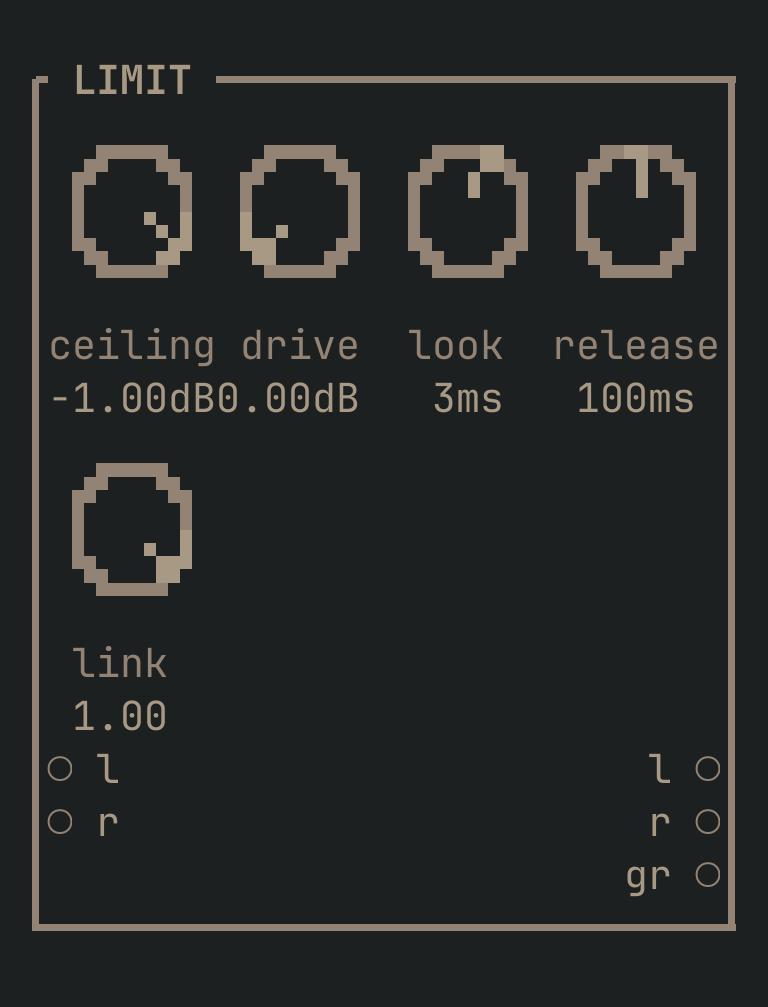
LIMIT to get this card.inputs
Down the left edge of the card, top to bottom.
- laudio
- Left in — or the whole mix, if it is mono.
- raudio
- Right in. Normals from
l.
outputs
Down the right edge, in the same order.
- laudio
- Left, limited.
- raudio
- Right, limited.
- grcv
- The gain reduction itself — 1.0 at rest, falling as it works. Patch it at anything that should duck in sympathy.
knobs
Left to right across the face — the dials in the picture.
- ceiling-24 … 0 dB= -1 dB
- The most the output may reach. -1 dB is the streaming ceiling: codecs reconstruct above the sample peaks, so a master touching full scale distorts after it leaves you.
- drive0 … 24 dB= 0 dB
- Gain INTO the limiter — the loudness knob. The ceiling holds the top still, so this raises the quiet parts. Watch the
groutput: more than 3-4 dB of reduction on sustained material starts to be audible as flattening. - look0 … 0.02 s= 0.003 s
- How far ahead the detector looks. Longer catches more without distorting and costs that much latency; 1-3 ms is transparent on almost anything.
- release0.005 … 2 s= 0.1 s
- How quickly it lets go. It is PROGRAMME DEPENDENT — a lone transient releases fast whatever this says, and only sustained limiting comes back at this rate, so one knob neither ticks nor pumps.
- link0 … 1= 1
- 1.0 moves both channels together, which keeps the stereo image still. Lower it and a loud left can duck alone, which is louder but makes the image lurch.
more
The full reference — every parameter curve, the patching notes and the worked examples — lives in the manual: docs.vimsynth.com/modules/limit. In the app itself, :help LIMIT opens the same page without leaving the rack.