vimsynth/modules/switch
SWITCH
A gate turns a signal on and off — or picks between two. Leave b unpatched (it normals to silence) and it is a mute; patch b and the same gate chooses between a and b. Crossfades, so it does not click.
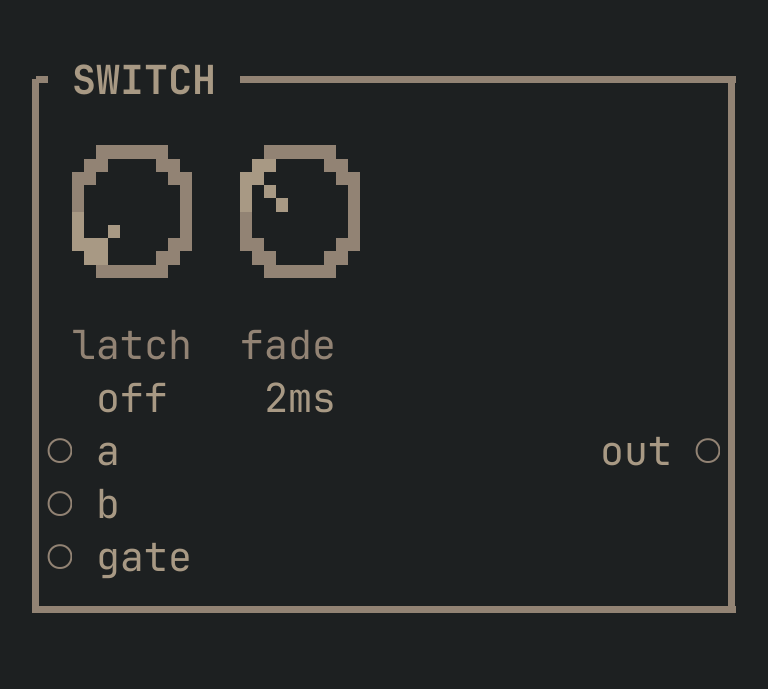
SWITCH to get this card.inputs
Down the left edge of the card, top to bottom.
- aaudio
- Passed when the gate is HIGH.
- baudio
- Passed when the gate is LOW. Normals to silence — so leaving it unpatched makes this a mute, and patching it makes the same module a two-way switch.
- gategate
- Chooses. With
latchon, each rising edge flips it instead.
outputs
Down the right edge, in the same order.
- outaudio
aorb, crossfaded so there is no click.
knobs
Left to right across the face — the dials in the picture.
- latchoff · on= off
- Latch: each rising edge FLIPS it, instead of it following the gate.
- fade0 … 0.5 s= 0.002 s
- How long the crossfade takes. Short enough not to hear as a fade, long enough that there is no click.
more
The full reference — every parameter curve, the patching notes and the worked examples — lives in the manual: docs.vimsynth.com/modules/switch. In the app itself, :help SWITCH opens the same page without leaving the rack.